Save Image As Type Chrome Extension – Instantly Save Images as JPG, PNG, or WebP
Easily save any image from the web in your preferred format — JPG, PNG, or WebP — using the Save Image As Type Chrome extension. Fast, simple, and perfect for creators.
Student Hacks
Oct 8, 2025
👉 https://chromewebstore.google.com/detail/save-image-as-type/gabfmnliflodkdafenbcpjdlppllnemd
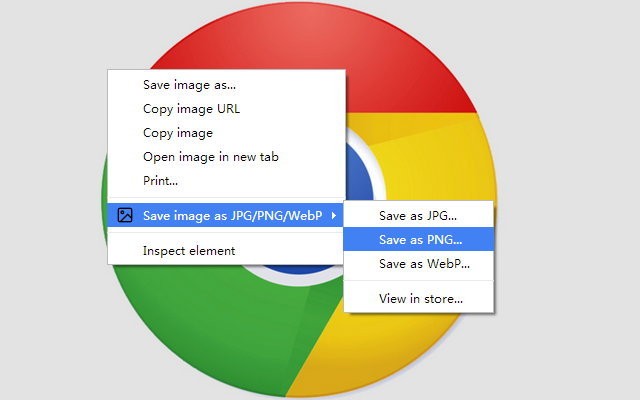
If you often download images from the internet and want them in a specific format, the Save Image As Type Chrome extension is a must-have tool. It lets you right-click on any image and choose whether to save it as JPG, PNG, or WebP — instantly, without needing any extra software or converters.
This lightweight extension is ideal for designers, bloggers, content creators, and students who regularly handle images. It helps you save time and keeps your workflow efficient.
Key Benefits:
Save images directly as JPG, PNG, or WebP
No need for online converters or editors
Works instantly from the right-click menu
100% free and easy to use
Boost your productivity and manage image formats effortlessly with this simple tool.
More to Discover


Save Image As Type Chrome Extension – Instantly Save Images as JPG, PNG, or WebP
Easily save any image from the web in your preferred format — JPG, PNG, or WebP — using the Save Image As Type Chrome extension. Fast, simple, and perfect for creators.
Student Hacks
Oct 8, 2025
👉 https://chromewebstore.google.com/detail/save-image-as-type/gabfmnliflodkdafenbcpjdlppllnemd
If you often download images from the internet and want them in a specific format, the Save Image As Type Chrome extension is a must-have tool. It lets you right-click on any image and choose whether to save it as JPG, PNG, or WebP — instantly, without needing any extra software or converters.
This lightweight extension is ideal for designers, bloggers, content creators, and students who regularly handle images. It helps you save time and keeps your workflow efficient.
Key Benefits:
Save images directly as JPG, PNG, or WebP
No need for online converters or editors
Works instantly from the right-click menu
100% free and easy to use
Boost your productivity and manage image formats effortlessly with this simple tool.
More to Discover
Save Image As Type Chrome Extension – Instantly Save Images as JPG, PNG, or WebP
Easily save any image from the web in your preferred format — JPG, PNG, or WebP — using the Save Image As Type Chrome extension. Fast, simple, and perfect for creators.
Student Hacks
Oct 8, 2025
👉 https://chromewebstore.google.com/detail/save-image-as-type/gabfmnliflodkdafenbcpjdlppllnemd
If you often download images from the internet and want them in a specific format, the Save Image As Type Chrome extension is a must-have tool. It lets you right-click on any image and choose whether to save it as JPG, PNG, or WebP — instantly, without needing any extra software or converters.
This lightweight extension is ideal for designers, bloggers, content creators, and students who regularly handle images. It helps you save time and keeps your workflow efficient.
Key Benefits:
Save images directly as JPG, PNG, or WebP
No need for online converters or editors
Works instantly from the right-click menu
100% free and easy to use
Boost your productivity and manage image formats effortlessly with this simple tool.